Step 01
Digital trigger
A delivered status from Amazon or Robu.in, or a courier SMS or WhatsApp message, starts the search.

Tracking ends at the front door. Korv Glanz picks it up from there: it links each delivery to the camera footage and records who received the parcel and exactly where they left it.
At a glance
Parcel tracking inside the building
01 / The challenge
01
Whoever is nearest the door signs for the parcel and leaves it on a random desk, workbench or shared area.
02
The person who ordered it can't find it, assumes it never arrived, and the item gets ordered again.
03
Sign-in sheets and mailroom staff don't suit lean teams. The fix had to need no change in anyone's habits.
Where Deliveries Come From
The search starts from a real delivery, not from round-the-clock watching. Orders are read from the shops the team buys from, and anything else is caught from courier messages.
Amazon offers no order API for buyer accounts, so a headless browser reads the delivered status and time from Returns & Orders.
Order status and the exact delivered time come straight from Robu.in, checked around the expected delivery date.
For local couriers, DHL or Blue Dart, messages like “Delivered” or an OTP confirmation start the search too.
Your order has been successfully delivered!
A real delivery from our own office, from the message that started the search to the answer on the dashboard
02 / How it works
What happens after a delivery is confirmed, from the message to the dashboard.
A delivered status from Amazon or Robu.in, or a courier SMS or WhatsApp message, starts the search.
The system pulls the NVR recordings from around the delivery time.
People and parcels are detected; re-identification keeps the same person's identity across cameras.
The drop is logged when the parcel stays still and the person who carried it walks away.
A vision-language model looks at the final frame and writes where the parcel is, in plain words.
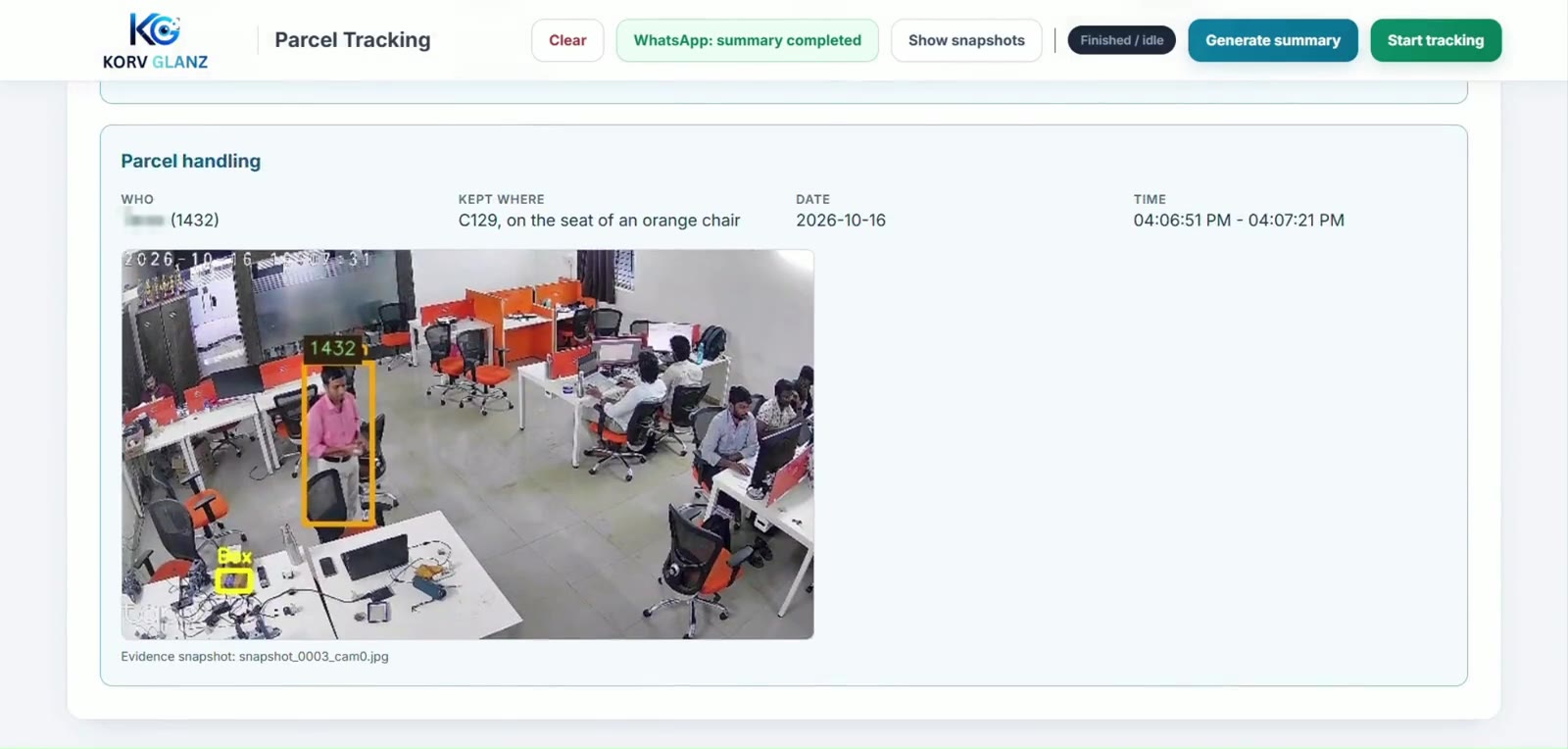
Who received it, where it is and when, with a proof clip and snapshots.
Example answer
“C129, on the seat of an orange chair.”
See It Run
Recorded in our own office. The Amazon message arrives, both cameras are searched, the person carrying the parcel is identified, and the dashboard says where it was left.
Getting Custody Right
Early tests credited parcels to whoever happened to be nearby. These rules fixed that, so the name on the record is the person who actually handled it.
01
The parcel counts as carried only when its centre stays inside a person’s box for a sustained run of frames. Someone walking by in the background isn’t credited.
02
The drop is logged only when the parcel stays still and the person who carried it walks away, so a parcel set down for a second isn’t mistaken for its final place.
03
Re-identification matches clothing, colour, posture and build, so the carrier keeps one identity as they cross from one camera to the other or step behind a pillar.
04
For the description, the system picks the clearest unblurred frame of the parcel where it was left, so the location is written from what is actually visible.
On Every Delivery Record
Anyone in the office can open the dashboard and find a parcel without asking around or scrubbing through footage.
There is no round-the-clock video analysis. A delivery message starts a search of the footage around that moment, so everything runs on one server next to the existing NVR.
03 / Outcomes
The system doesn't watch footage around the clock. It only looks when a delivery is confirmed, which keeps the compute small enough to run everything on one on-site server.
Runs On Site
Everything runs on one on-site server. Nothing is sent to the cloud.
| Area | How it is handled |
|---|---|
| Compute | One on-site GPU server runs detection, re-identification and the vision-language model together |
| Cameras | Two IP cameras with overlapping views of the entrance and the main desks, recorded by the existing NVR |
| Footage | Only the few minutes around each confirmed delivery are pulled from the NVR |
| Identity | People are matched against an internal gallery of employee appearance kept on the server |
| Dashboard | Served over the office network, with the record, snapshot and proof clip for each delivery |
Limits and What’s Next
A parcel put in a drawer, a locker or under a table can’t be described, because the description comes from what the camera sees.
Flat envelopes and thin mailers can blend in with paperwork and go undetected.
If a shop changes its order page and no courier message arrives, the search never starts.
If the NVR is offline when a delivery lands, there is no footage to search.
A small second model trained only on envelopes and flat mailers.
If a delivery is confirmed but no parcel is seen, the search widens and flags possible matches for a person to check.
Readers that adapt when a shop’s order page changes, so triggers keep coming.
For larger buildings, the work spreads across several edge servers.
See how Korv Glanz follows deliveries on your own cameras, and where it finds them.
Tell us a little about your building and our team will get in touch.